
Blood Pressure Tracker
aadhkMedical
4.61.37K Reviews
- Version
- 16.5.1-inApp
- Installs
- 1.00M
- Age Rating
- Everyone
Screenshots
Our Review of Blood Pressure Tracker
 Analysis by Appyee
I like a health app best when it makes a routine easier without pretending to replace good medical care. Blood Pressure Tracker is built around that practical idea: it gives you a place to record readings and look back at them, rather than turning blood pressure management into a complicated project. I’d recommend it to someone who already has a blood pressure monitor and wants a more organized record to discuss with a health professional.
Simple logging, with a few important caveats
The first thing I’d keep in mind is what an app like this can and cannot do. It can help you keep track of measurements taken with a proper monitor; a phone app by itself is not a substitute for a blood pressure cuff or a medical assessment. That distinction matters, especially if you are checking because of a new symptom or a worrying result. I treat the app as a record-keeping tool, not as a way to diagnose myself or decide whether I need care.
That role suits its Medical category. Developed by aadhk, the app is free to install, has an Everyone content rating, and has been around since Oct 24, 2011. Its current version is 16.3.3-inApp, and it requires Android 5.0 or later. The average rating is 4.7 from around 26,000 ratings, with over 1 million installs. Those figures suggest it has reached many people, but they don’t tell me whether its workflow fits my needs; the useful test is whether logging remains clear and consistent over time.
A routine that makes readings more useful
One practical way to use a tracker is to decide on a repeatable measuring routine before opening the app. Take readings as directed by your monitor’s instructions, then enter them soon afterwards, while you can still remember the circumstances. If you have been rushing around, are unsure whether you used the same arm, or took a reading at an unusual time, a brief note can help explain why that entry may not be comparable with your usual pattern. A tidy record is more useful than a long one full of unexplained exceptions.
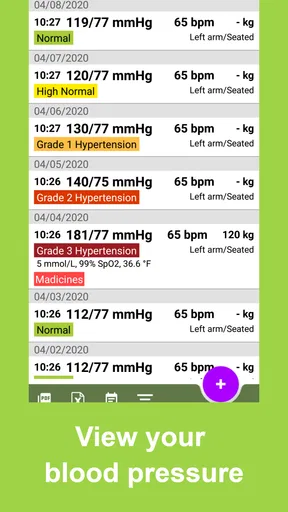
For example, imagine you are asked to bring home readings to an appointment. Instead of trying to reconstruct several days from scraps of paper, you can use the app to keep entries together and review the overall record before you go. I’d still bring the actual monitor if a clinician asks to check it, and I would follow their advice about how often to measure. The app helps with organization; it does not decide which readings matter clinically.
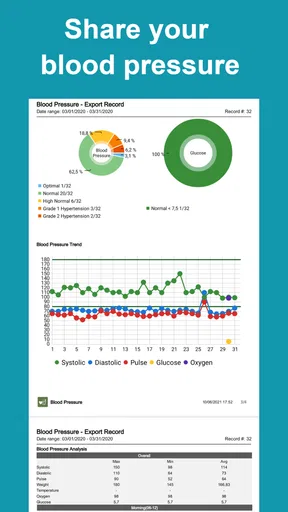
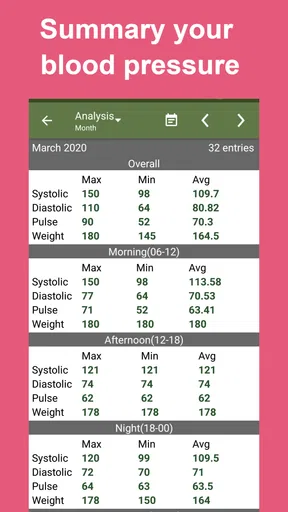
Its stated feature set includes reminders, graphs, insights, and data export. Those tools can make a simple log more useful, but I’d use them with a little care. A graph can make changes easier to notice, yet a line moving up or down is not an explanation of the cause. Likewise, an export is handy for sharing a record, but I would check that the selected dates and entries are complete before relying on it for an appointment.
Where the convenience has limits
A reminder can support a routine, but too many prompts can become background noise. I’d set one only after choosing a schedule that makes sense for my own situation, rather than measuring more often just because the app can remind me. If a clinician has suggested a particular plan, that should guide the schedule. If not, I would ask for advice rather than treating a reminder setting as medical guidance.
There is also a small practical friction in the reported experience: syncing between devices can sometimes take a while. If you plan to switch phones or rely on more than one device, don’t assume a new entry will appear everywhere immediately. Check that the record is present where you need it, and avoid keeping the only copy of an important history in a place you have not verified. That is especially relevant before an appointment or when sharing a report.
The app offers in-app purchases ranging from $0.99 to $29.99 per item. I’d start with the free version and see whether the basic recording and review workflow is enough before paying for anything. The paid options may suit some people, but I would not assume they are necessary for maintaining a useful log. If you only need occasional entries, a notebook or a basic spreadsheet could be simpler; if you want reminders and graphs in one place, an app has a clearer advantage.
Who will get the most from it
I think this is a good fit for someone who measures at home with a separate monitor, wants to build a consistent record, and is comfortable entering information manually. It may also suit a family member helping an older relative keep readings organized, provided they agree on who enters the numbers and how the record will be shared. Clear ownership matters: two people recording the same reading differently can make a history less dependable, not more.
It is less suitable for someone expecting the phone to measure blood pressure on its own, or for anyone looking for a diagnosis, treatment plan, or urgent medical advice. If you are dealing with alarming symptoms or a reading that concerns you, use appropriate medical services rather than waiting for an app chart to provide reassurance. People who dislike manual entry may also find that a paper log is easier to maintain, while someone whose monitor already offers a preferred recording workflow may not need another layer.
Compared with a notebook, the app’s main appeal is the chance to review entries visually and use reminders or export tools. Compared with a general health log, its focus on blood pressure makes the task more direct. But neither a graph nor a digital record automatically makes measurements accurate. The monitor, your technique, and a consistent routine still do the essential work.
My recommendation
The app has a strong user rating and a substantial audience, but I’d judge it by a more personal question: does it help you keep a complete, understandable record without adding stress? If the answer is yes, its combination of logging, visual review, reminders, and export can be genuinely useful. If you mainly want medical interpretation or automatic measurement, it is the wrong tool for that job.
I’d begin with a few days of careful entries, use the same measuring routine each time, and see whether the graphs and reminders actually help. Before sharing information, review the entries and make sure the file covers the period you intended. That small check makes the app’s convenience more dependable.
Have you ever felt the need to keep a close tab on your blood pressure, but found the process a bit cumbersome? Well, let me introduce you to the Blood Pressure Tracker app. I’ve been using it for a few weeks now, and it’s been a game-changer in how I manage my health metrics. Let me walk you through my experience with this app.
First Impressions
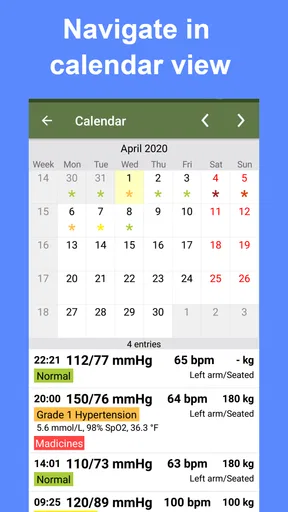
You know how sometimes you download an app and it feels like you need a degree to navigate it? Not the case here. The app is impressively intuitive. From the moment I fired it up, I was greeted with a clean, simple interface that made entering and accessing data a breeze.
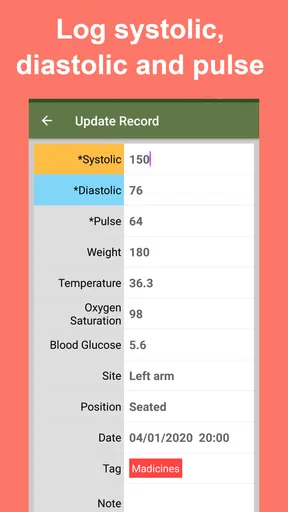
The setup process was straightforward. After entering my basic info like age, weight, and height, I was ready to start logging my blood pressure readings. The app even offered helpful tips on how to take accurate measurements, which I found super handy.
Key Features
Alright, let’s dive into some of the features that make this app stand out:
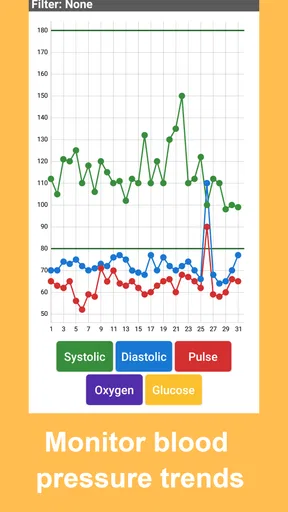
- Real-Time Tracking: Every time you log a new reading, the app updates your stats instantly. It’s perfect for spotting trends over time.
- Customizable Reminders: I often forget to take my readings, but the app’s reminder feature has saved me more than once.
- Data Export: Need to share your data with your doctor? Easy peasy. The app lets you export your readings in various formats.
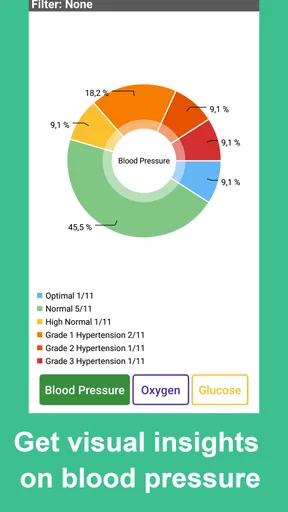
- Insights and Analysis: The app offers insights into your blood pressure patterns, helping you understand how your lifestyle affects your health.
User Experience
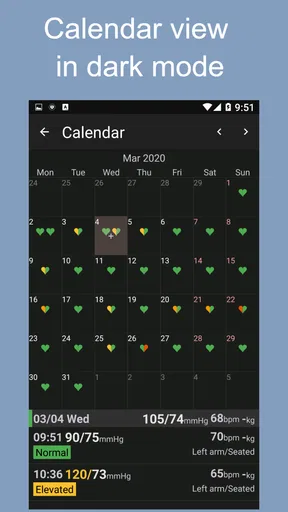
Using the app daily has been a smooth ride. The ability to log readings in just a few taps is a big plus. I particularly love the visual graphs that show my progress over weeks and months. It’s motivating to see the lines trend in the right direction!
One little quirk I noticed is that sometimes the app takes a bit to sync between devices. Not a deal-breaker, but something to keep an eye on.
Why It Stands Out
So, why choose it over other similar apps? For me, it’s the blend of simplicity and comprehensive features. It doesn’t overwhelm you with unnecessary fluff, yet it provides all the tools you need to effectively manage your blood pressure.
Another thing worth mentioning is the app’s community. There’s a strong sense of support and users often share tips and experiences, which I found quite encouraging.
In conclusion, if you’re looking for a reliable and user-friendly way to keep track of your blood pressure, this app is definitely worth a shot. It’s like having a personal health assistant right in your pocket. So go ahead, give it a try, and take a step towards better health management. You won’t regret it!
Verdict
Strengths of Blood Pressure Tracker
- Easy-to-navigate interface.
- Customizable reminders for checks.
- Comprehensive data analysis tools.
- Secure data storage options.
- Syncs with wearable devices.
Limitations of Blood Pressure Tracker
- Limited free version features.
- Ads can be intrusive.
- Requires manual data entry.
- No multi-user support.
- Occasional syncing issues.
Similar Picks in This Category
View All
WebMD: Symptom Checker
WebMD, LLC4.1

Microphone Amplifier
DOSA Apps4.2

Anatomy Learning - 3D Anatomy
3D Medical OU4.5

Period Tracker and Calendar
SimpleInnovation4.9

GoodRx: Prescription Coupons
GoodRx4.8

CVS Health
CVS Pharmacy4.5
Frequently Asked Questions
How does the Blood Pressure Tracker app monitor my blood pressure?
The Blood Pressure Tracker app allows users to manually input their blood pressure readings, which can be taken using a home blood pressure monitor. The app does not measure blood pressure directly but helps track and analyze your readings over time for better health management.
Is my personal health data secure within the Blood Pressure Tracker app?
Yes, your personal health data is secure with the Blood Pressure Tracker app. The app employs encryption and other security measures to ensure your information is kept safe. However, it is always recommended to review the app's privacy policy to understand how your data is handled.
Can I share my blood pressure data with my doctor using this app?
Yes, the Blood Pressure Tracker app typically includes features that allow you to export your data in various formats. You can easily share this information with your healthcare provider via email or other methods, facilitating better communication and personalized care.
Does the app provide any insights or recommendations based on my blood pressure readings?
The Blood Pressure Tracker app often includes features that analyze your readings and offer insights or trends over time. While it may provide general lifestyle recommendations, it is crucial to consult with a healthcare professional for personalized medical advice.
Is the Blood Pressure Tracker app compatible with other health apps or devices?
Many versions of the Blood Pressure Tracker app are designed to integrate with other health apps and smart devices, such as fitness trackers or health management platforms. This compatibility allows for a more comprehensive view of your overall health metrics, enhancing your tracking capabilities.
